
Where to find this
HotelConnext › Portfolio › Open your hotel › Reservations › New booking › Reserve inventory
For: authorized front-desk staff recording a direct reservation after the hotel is live.
Step 1 — Set the stay dates #
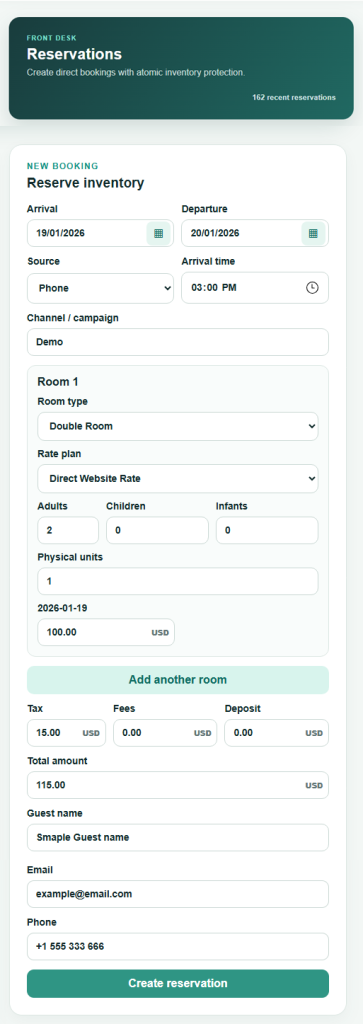
Open your hotel’s Reservations page. In New booking → Reserve inventory, enter arrival and departure dates.
Step 2 — Choose the direct booking source #
Select the source: Walk-in, Phone, Website or Other. Add an arrival time and a channel or campaign if useful.
Step 3 — Add rooms, guests and nightly rates #
Choose the room type and rate plan. Enter adults, children, infants and the number of physical units. Review the nightly rate for each night. Use Add another room when this reservation includes another room.
Step 4 — Check totals and guest details #
Enter tax, fees or deposit as applicable. Confirm the calculated total and enter the primary guest name. Email and phone are optional.
Step 5 — Create and verify the reservation #
Select Create reservation once. Check the new reservation in the list and confirm that availability changed for each occupied night.
Use Edit booking on the same page when the reservation changes. Do not create a second reservation to correct the first. If the desired room is unavailable, resolve the inventory difference before saving.


