
Where to find this
HotelConnext › Portfolio › Open your hotel › Inventory › Inventory calendar › Stop Sell
For: hotel owners and authorized inventory staff.
Step 1 — Select the room, rate plan and dates #
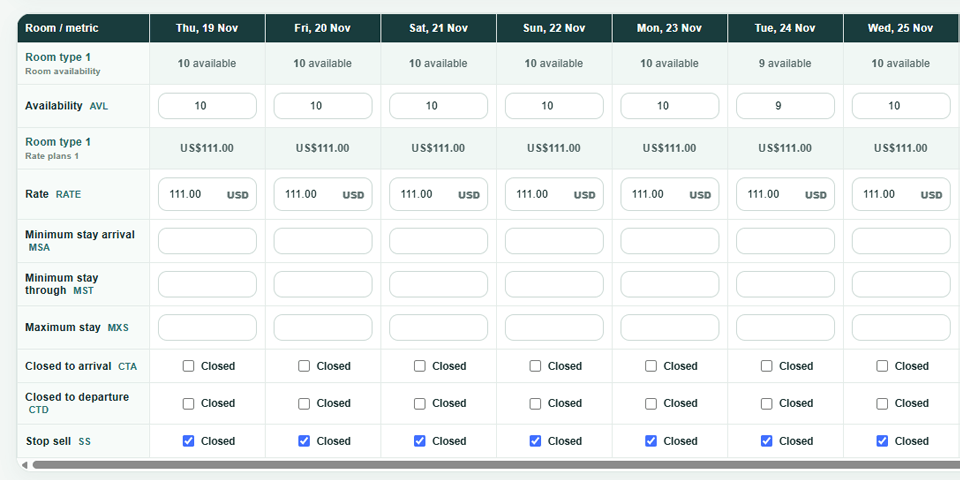
Open Inventory calendar and select the affected room type, rate plan and dates.
Step 2 — Set Stop Sell and preview #
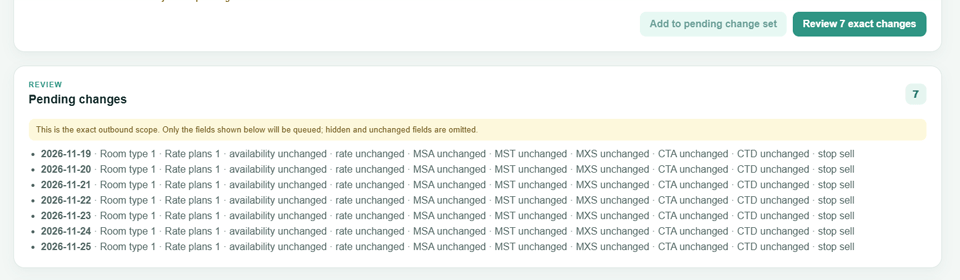
Set Stop Sell and preview the exact changes.
Step 3 — Save the reviewed dates #
Review the dates carefully, then save.
Step 4 — Verify delivery to the OTA #
Check the delivery status and verify the closed dates in the connected OTA.
Stop Sell prevents new sales through that rate plan; it does not cancel existing bookings or reduce the physical room count. When reopening, review all active bookings and the remaining inventory first.


