
Where to find this
HotelConnext › Portfolio › Open your hotel › Opening inventory › Temporary capacity for existing bookings
HotelConnext › Portfolio › Open your hotel › Inventory › Inventory calendar › Stop Sell
For: hotel owners who can arrange additional real rooms.
If confirmed bookings exceed the recorded physical room count, HotelConnext shows the number of additional rooms needed for each affected night. The booking record still needs to reflect the real reservation.
Step 1 — Verify the excess booking #
Confirm the reservation and room type in the source system.
Step 2 — Secure real additional rooms #
Arrange the additional real room capacity with your hotel or a partner.
Step 3 — Record temporary capacity for affected nights #
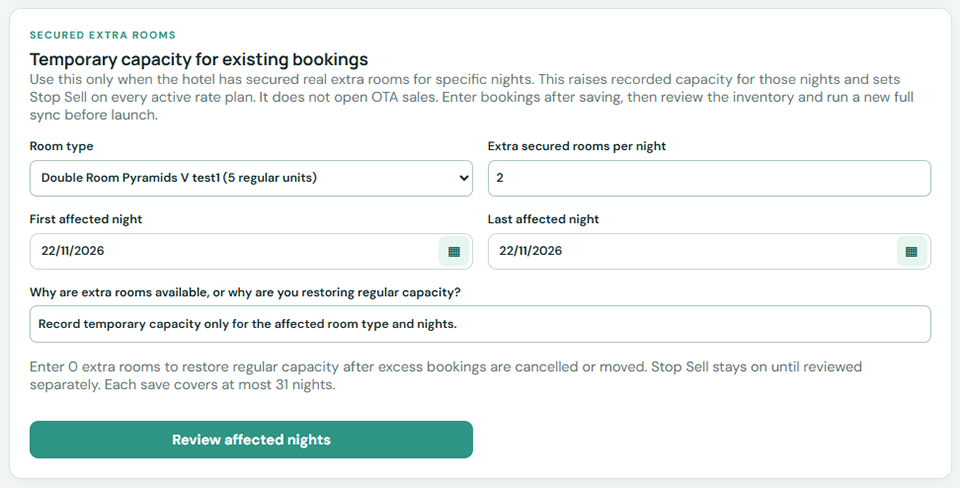
Record temporary capacity only for the affected room type and nights.
Step 4 — Keep extra capacity closed to new sales #
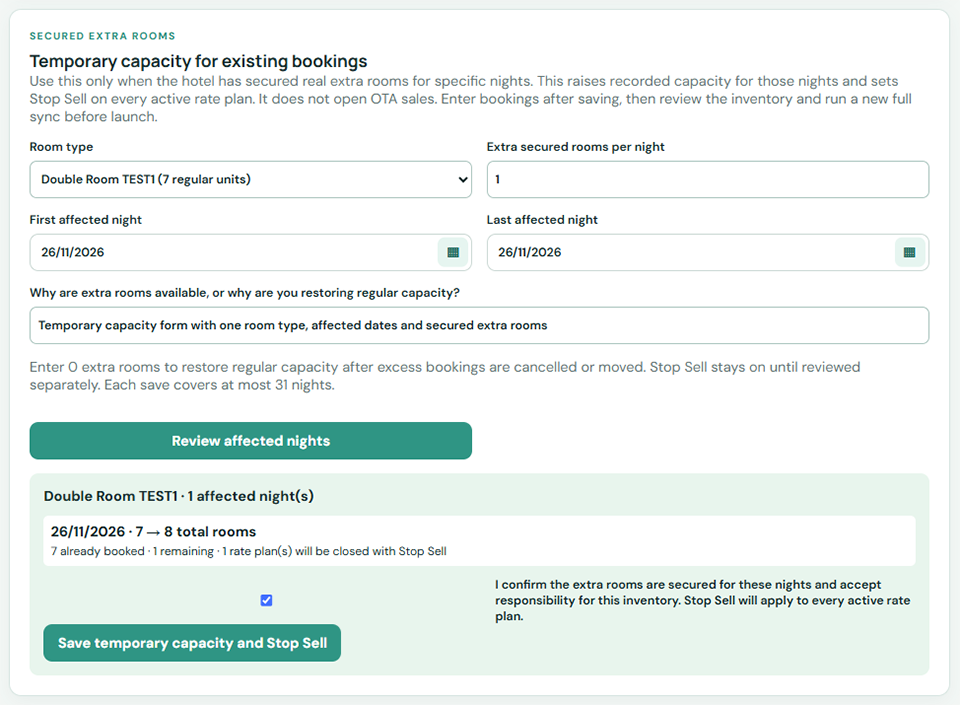
Keep Stop Sell on the affected rate plans so the extra capacity is not sold again.
Step 5 — Restore regular capacity after a real change #
When a booking is genuinely cancelled or moved, correct the reservation and remove the temporary capacity that is no longer needed.
Check: booked, regular, temporary and remaining counts match the hotel’s actual commitments. Do not add fictional sellable rooms.


