
Where to find this
HotelConnext › Portfolio › Open your hotel › Website › Website connectors
Your WordPress hotel website › HotelConnext Connector
Before you start: your hotel-owned Traveler website needs the HotelConnext Connector plugin. This connection is specific to one HotelConnext Property.
Step 1 — Create a website connection #
In your hotel, open Website → Website connectors. Under Create activation code, enter a clear connection name and the website’s exact HTTPS URL.

Step 2 — Copy the short-lived activation code #
Select Create 30-minute code. Copy the code while it is displayed; it is shown only once.
Step 3 — Activate the website plugin #
On the hotel website, open the HotelConnext Connector settings and paste the code into Activate this website.

Step 4 — Check the connection and room mapping #
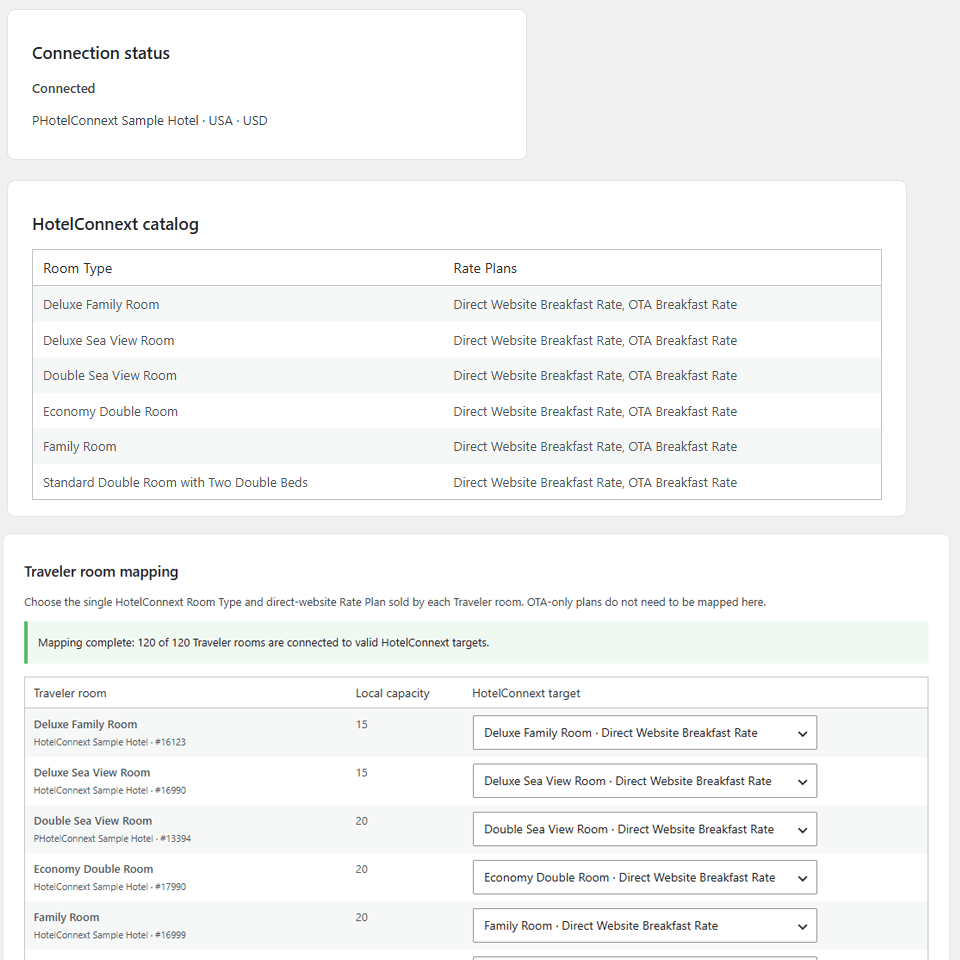
Return to Registered websites and confirm the connection is active. In the website plugin, check that every website room maps to the correct HotelConnext room.
Step 5 — Review inventory and booking policies #
Review the website’s inventory and the booking policies before enabling its checkout or native booking synchronization.
The website receives access to this hotel only. It does not receive Channex credentials. An activation code is tied to the exact URL, so avoid spaces or punctuation after the domain.


